How PHP files work?
PHP/ PHP runtimes /Web server
We can write PHP files in a text editor without downloading anything. The reason we usually download Xammp, or whatsoever is because we need to run PHP files to see the results. There are 2 ways to run PHP code:
1). To show the results on a browser
This is a common way to run PHP code. That is why we need to set up a web server on our local machine and what I use is Xammp. The web server is Apache here. There are lots of other web servers we can use as well, like Nginx, IIS. However, it does not mean that web server can run the PHP code. When the web server encounter PHP files, it will call PHP runtime to run the code and return the output, for example HTML files, as part of response to the browser. The official PHP runtime is Zend Engine. There are other PHP runtimes, like Phalanger.

View running PHP file results from the browser
2). To show the results on the terminal
This is to explain that PHP code can be not associated with a web server. We still need to download PHP to run PHP code. A lazy way would be still using Xammp as it already has PHP inside, but do not start Apache web server. Then we can run PHP file using CLI.
1 | # test.php |
1 | #!/bin/bash |
PHP 8 has JIT compiler now
PHP is a server-side scripting language similar to JavaScript which is a client-side scripting language. They are interpreted language, which means they need an interpreter or virtual machine to translate the language into different machine code depending on which system it is running on.
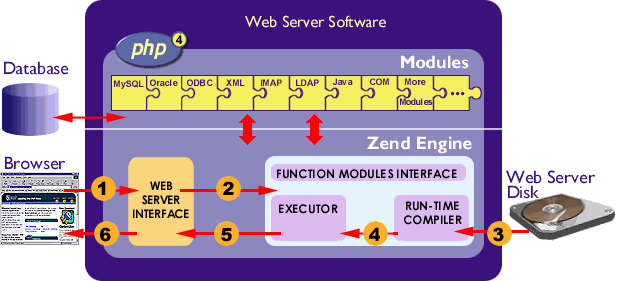
Zend Engine interal structure
This makes the interpreted language less performance and freedom when compared with compiled languages which can be compiled beforehand. Similar to powerful JavaScript engine Chrome V8, PHP 8 Zend engine uses JIT compilation to compile part of the PHP code, so the Zend virtual machine does not need to interpreter this part of code anymore. The rest of the code still need to wait the virtual machine to specify the operating system before interpreting them. Here is the illustration about how PHP works with and without JIT.
PHP works without JIT: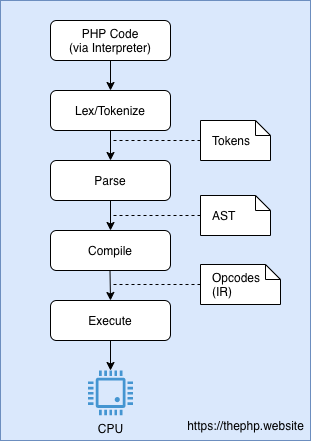
PHP works with JIT: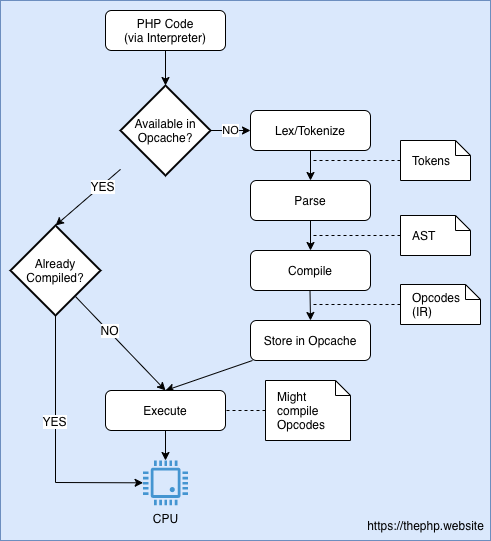
References
https://code-boxx.com/how-to-run-php-script-sapi-cli/
https://thephp.website/en/issue/php-8-jit/
https://en.wikipedia.org/wiki/Zend_Engine#:~:text=The%20Zend%20Engine%20is%20the,Technologies%20in%20Ramat%20Gan%2C%20Israel.